Reduce Image Size to 200 KB, 100 KB or 50 KB
Compress a CNIC, ID card, photo or document image to the file size your form asks for. Pick a target and the tool finds the best quality that fits.
More Free ID & Document Tools
Browser-side processing. Your files stay private.
Image & Form Utilities
⭐ Free Online Image Size Reducer · Fast, Safe & Mobile Friendly
The form says “upload a JPG under 200 KB”, and your phone photo is 3 MB. You cannot send it, and retaking the photo at lower quality is guesswork.
This free tool reduces your image to the size you pick. Choose 200 KB, 100 KB, 50 KB or type your own number, and it finds the best picture quality that still fits. Everything runs in your browser, so your image stays on your phone or computer.
Quick answer: Upload the image, pick a target size, look at the preview, and download. If the target is too small for the picture, the tool tells you instead of quietly sending a blurry file.
Why a photo is so big
Three things decide a file’s size.
| Factor | What it means | Effect on size |
|---|---|---|
| Pixels | Width times height of the picture | More pixels means a bigger file. A modern phone photo has millions |
| Quality | How strongly JPEG compresses the picture | Lower quality means a smaller file, but softer detail |
| Format | JPG, PNG or PDF | JPG is the smallest for photos and scanned cards |
A phone photo of a card usually has far more pixels than any form needs. That is why shrinking it works so well.
How the tool reaches your target
You do not need to guess slider values. The tool works like this:
- It looks for the highest JPEG quality that still fits under your target.
- If even the lowest allowed quality is too big, it makes the picture a little smaller, step by step, and tries again.
- It stops before the picture gets too small (the shorter side stays above 300 pixels). If your target still cannot be met, it shows the smallest result it could make and says so.
Reduce image size in four steps
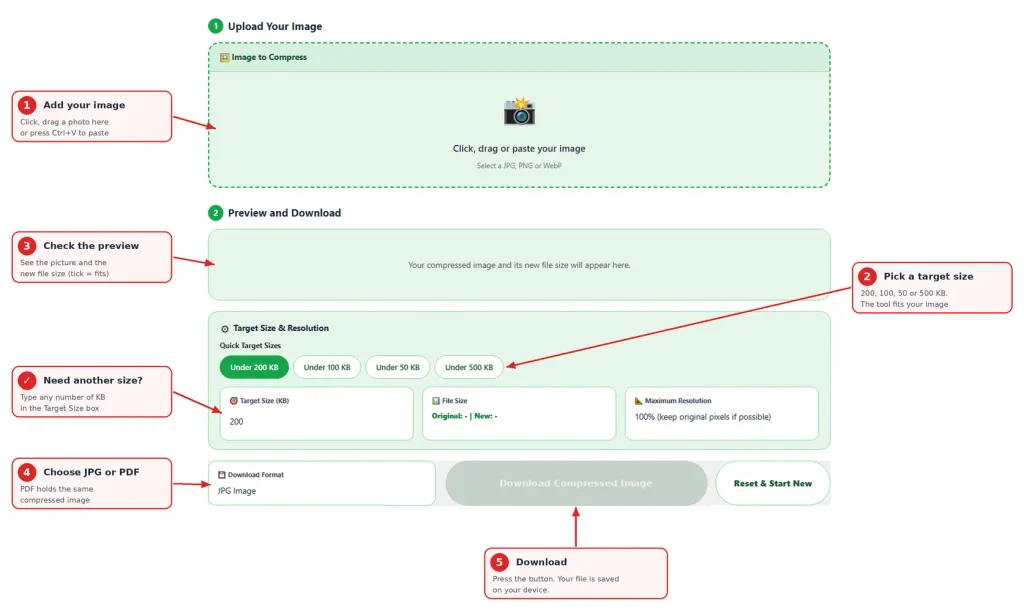
- Add your image. Click the box, drag a file in, or paste with Ctrl+V.
- Pick a quick target (200, 100, 50 or 500 KB) or type your own size in KB.
- Check the preview and the file size. A tick appears when the target is met.
- Choose JPG or PDF and press Download Compressed Image.
Which target should you pick
| Target | Works well for | Watch out for |
|---|---|---|
| 500 KB | Forms that allow a larger file, best quality | Some portals reject it |
| 200 KB | A full ID card copy, certificates, most upload forms | Small text stays readable in most cases |
| 100 KB | Simple photos and clear scans | Check small numbers in the preview |
| 50 KB | Small photos and signatures | A full ID card with tiny print may turn blurry |
Always zoom into the preview before downloading. If you can read the numbers and names, the receiver probably can too.
Make the file smaller before you compress
A few habits help the tool reach small targets without losing detail.
- Crop tightly. Cutting away the table and background removes pixels you do not need.
- Use a plain background. A flat surface compresses much better than a patterned one.
- Shoot in daylight. Noisy, dark photos are harder to compress.
- Compress last. If you also merge sides or add a watermark, do those first and compress at the end, so the picture is only re-saved once.
Need front and back on one page? Use our merge tool first, save as JPG, then reduce it here.
JPG or PDF
This tool gives you JPG, or a PDF that contains that same compressed JPEG. A PDF is slightly bigger than the JPG because of its wrapper, so the tool aims a little lower for PDF to stay under your target.
There is no PNG option on purpose. PNG cannot be shrunk by lowering quality, so we could not honestly promise a size.
Is it safe to compress an ID image online?
Your image is processed inside your browser and is not sent to our server. You can test this yourself. Open the page, switch off your internet and compress a JPG. The PDF option fetches a small helper file the first time, so test with JPG.
An ID image still has personal details, so delete downloaded copies from shared computers.
When something looks wrong
- The tool says the target could not be reached. The picture is too detailed for that size. Crop it tightly, or try a slightly larger target.
- The text is blurry. The target is too small for this picture. Pick a bigger target.
- The file got bigger. Your original was already small, for example a lightly compressed file. Use the original.
- A portal still rejects the file. Some portals also ask for a minimum size, a specific format or exact dimensions. Read the instruction on the page.
Frequently Asked Questions
Yes. It is free and needs no sign-up.
No. The compression happens in your browser. Only the PDF option fetches a small helper file from a public library the first time, and your image is not part of that request.
Add the photo, keep the 200 KB target, check the preview and download. If your photo has a lot of background, crop it first.
Yes, a smaller file always means some loss. The tool keeps the highest quality that fits your target, and it will not shrink the picture beyond a safe limit.
The tool shows the smallest result it could make and tells you. Crop the picture or choose a larger target.
PNG cannot be compressed by quality, so we could not promise a target size. JPG and PDF can.
A PDF adds a small wrapper around the image. The tool allows for this and aims lower for PDF.
This tool handles one image at a time.
Yes. Tap the box and choose a photo from your gallery or take a new one.