Merge Passport Pages Online
Combine your Passport Data Page and Signature/Bio Page onto a single printable document for visa & official verification.
More Free Travel & ID Document Tools
Browser-side processing. Your files stay completely private.
Travel & ID Utilities
⭐ Free Online Passport Merger · Fast, Safe & Mobile Friendly
When a visa centre or bank asks for a “passport copy, front and back”, a passport does not really have a front and a back the way an ID card does. What they usually mean is the data page, the one with your photo and details, plus one more page. Sending those as two separate photos is how pages get lost.This tool puts two passport pages on one sheet. It keeps the standard passport page size, so the printout looks like the real page. It runs in your browser, and your photos are not sent to any server.
Which two pages do you need?
The tool does not know which pages you add. It simply places two images on one sheet, so you can use any two pages. These are the ones people ask for most.
| Page | What it usually shows | Add it when |
|---|---|---|
| Data page (also called the bio page) | Your photo, name, passport number, dates, and two lines of characters at the bottom | Almost always |
| Signature or address page | Details such as your signature or address. What is printed here depends on the country that issued the passport, so check your own booklet | The receiver asks for “the last page” or “the address page” |
| A visa or entry-stamp page | Visas and stamps | Only if the receiver asks for it |
If you are not sure what to send, ask the receiver which pages they want. A copy with the wrong page is a wasted trip.
How to merge your passport pages
- Add the first page. Click the Passport Main Bio / Data Page box, drag a photo in, or paste one with Ctrl+V.
- Add the second page. Do the same in the Signature / Address Page box. JPG, PNG and WebP work.
- Check the preview. Zoom in on the passport number, the dates and the two lines of characters at the bottom of the data page. All of it must be readable.
- Change the settings only if you need to. The tool opens with the standard passport size, an A4 sheet and the pages stacked.
- Download. Pick PDF, JPG or PNG and press Merge & Download Passport.
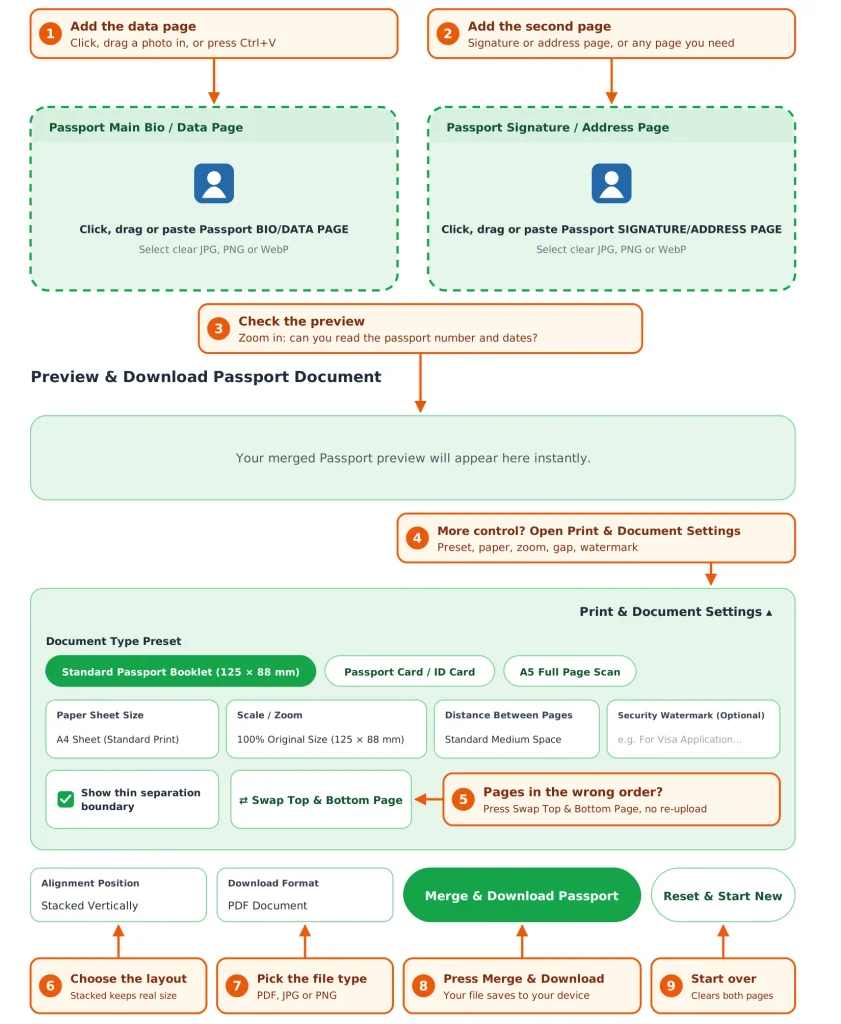
If the pages are the wrong way round, press Swap Top & Bottom Page instead of uploading again. Press Reset & Start New to clear both pages.You can also add just one page. The data page then prints at the top of the sheet, and a signature page added alone prints in the lower slot.
Choose a layout that keeps the real size
A passport page is 125 × 88 mm (the ID-3 size set out in the international standard for passports), which is larger than a bank card. Two of them side by side are too wide for an A4 page that is held upright. This table shows what you actually get at the default 100% scale.
| Layout | Paper | What you get |
|---|---|---|
| Stacked | A4 or Letter | Both pages at real size (125 × 88 mm) |
| Side by side | A4 or Letter | Pages shrink to about 70% (roughly 89 × 62 mm on A4) so they fit |
| Stacked | Fit Passport Pages Only | Real size, on a page cut to the two passport pages |
| Side by side | Fit Passport Pages Only | Real size, on a wide landscape page |
So for printing on A4 or Letter, use the default stacked layout. Use side by side only with “Fit Passport Pages Only”, or if you do not mind smaller pages.
Other settings you may want:
- Scale / Zoom: 100% is the real size. Pick 115% if small text is hard to read, or 90% for a compact copy. Stacked pages still fit at 115% on A4.
- Distance Between Pages: from none to a large gap (20 mm). The default is a 12 mm gap.
- Show thin separation boundary: a thin grey line around each page. It is on by default, so untick it for a clean upload.
- Document Type Preset: the Passport Card / ID Card preset switches to card size (85.6 × 54 mm), and the A5 Full Page Scan preset uses a larger frame. They change the size of the frame only.
Take photos the receiver can actually read
Most rejected passport copies fail for the same few reasons.
- Get the two lines at the bottom of the data page into the picture. This is the machine-readable zone, two rows of 44 characters. It repeats your name, number and dates in a form that scanners read, and many offices check it first.
- Avoid glare. The data page is glossy. Tilt the booklet slightly or move away from the lamp until the shine is gone, and keep your hand out of the shot.
- Keep the page flat. Open the booklet fully so the page does not curl, and hold it from the edges.
- Photograph each page on its own. A photo of the open booklet with two pages in one picture will be squeezed into a single slot and come out small.
- Match the orientation. Take both pages the same way up.
Keep your passport copy safe
A passport copy shows your name, photo, number and date of birth, and the machine-readable lines repeat those details. It is worth a little extra care.
- Add a watermark with the purpose and date, for example For visa application only – 14 Oct 20xx. It appears in light red across each page. Keep it short so it does not cover the numbers.
- Send it only through the official portal or email of the embassy, visa centre, bank or employer.
- Do not post it in chats or public groups.
- Delete it from shared computers, including the Downloads folder.
Common problems and quick fixes
| Problem | Likely reason | Fix |
|---|---|---|
| Pages look small on the sheet | Side by side on A4 shrinks them | Use stacked, or choose Fit Passport Pages Only |
| Text is hard to read | Low-quality photo, or a small scale | Retake the photo in better light, or pick 115% |
| A page is tiny inside its frame | The photo shows the whole open booklet | Photograph each page separately |
| Pages are in the wrong order | Photos went into the opposite boxes | Press Swap Top & Bottom Page |
| A grey line around each page | The separation boundary is on | Untick Show thin separation boundary |
| A portal says the file is too large | PNG makes bigger files | Download as JPG |
For more on how passports are standardised, see the ICAO Doc 9303 specifications for machine-readable passports.
Frequently Asked Questions
Yes. It is free, and you do not need an account.
No. The merge runs in your browser, and the photos stay on your device. Only the PDF helper script is fetched from the internet.
That depends on the country and the visa. This tool only arranges the pages you add, so check what the application asks for. The data page is the one almost every application needs.
Yes. Add only the data page and leave the second box empty, and the sheet will hold one page.
Stacked on A4 or Letter, each page prints at 125 × 88 mm, the standard passport page size. Use 115% for a larger copy.
Two passport pages side by side are wider than an upright A4 page, so the tool shrinks them to fit. Choose Stacked, or Fit Passport Pages Only, to keep the real size.
Yes. It places any two images on one sheet, so you can merge a data page with a visa or stamp page as well.