
Add Watermark to ID Card Online
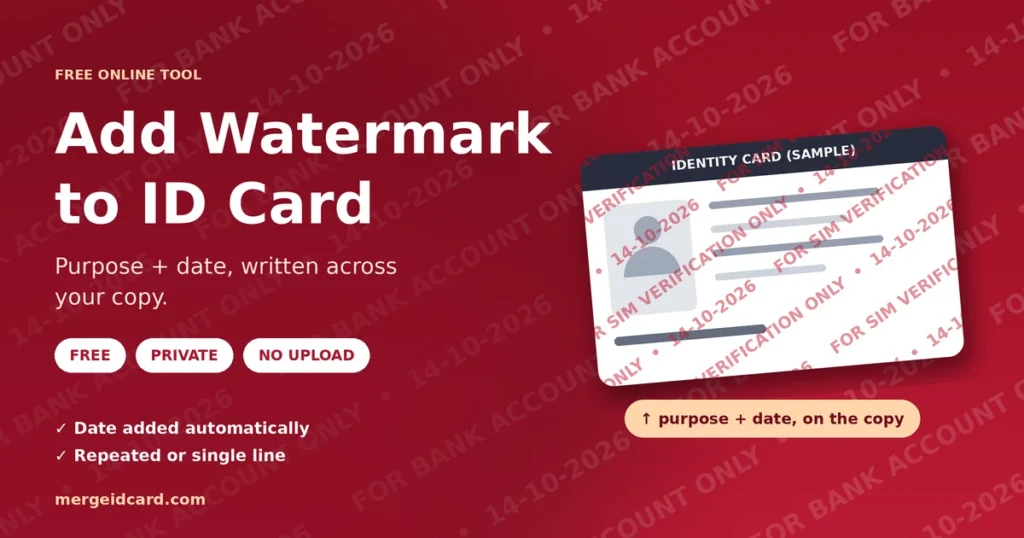
Write the purpose and the date across your ID card copy, so it is harder to reuse for anything else.
More Free ID Privacy & Editing Tools
Browser-side processing. Your files stay private.
Security & Image Utilities
⭐ Free Online ID Watermark Tool · Fast, Safe & Mobile Friendly
You send a copy of your ID card to a bank, a shop or a landlord. After that, you do not control where it goes. A plain copy can be forwarded, saved and used for something you never agreed to.A watermark will not stop a determined person, but it changes the copy.
It states what the copy was meant for and when it was made. This free tool writes that line across your ID card image. Everything runs in your browser, so your photo is not uploaded.
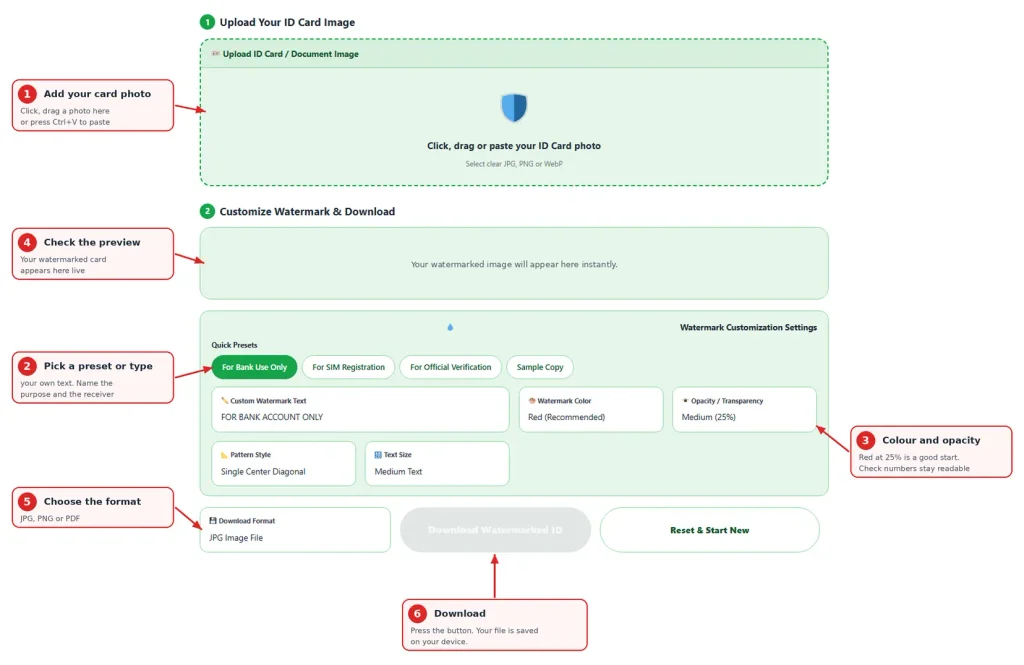
Quick answer: Upload the card photo, choose a preset or type your own line, keep “Add Today’s Date” on, check that the numbers are still readable, and download.
What a good watermark says
Three things make a watermark useful: the purpose, the receiver and the date.
| Situation | Example text |
|---|---|
| Opening a bank account | FOR ABC BANK ACCOUNT OPENING ONLY |
| Getting a SIM card | FOR SIM VERIFICATION ONLY |
| Job application | FOR XYZ COMPANY HIRING ONLY |
| Renting a home | FOR RENTAL AGREEMENT ONLY |
| Sharing a sample | SAMPLE COPY – NOT VALID |
The tool adds today’s date after your text, for example “FOR SIM VERIFICATION ONLY • 14-10-2026”. If someone later uses the copy for a different purpose, the line shows that this was not what you gave it for.
Add Watermark to ID Card in Four Steps
- Add your card photo. Click the box, drag a file in, or paste with Ctrl+V.
- Pick a preset or type your own text. Name the receiver if you can.
- Look at the preview. The numbers and your photo should still be easy to read.
- Choose JPG, PNG or PDF and press Download Watermarked ID.
Choose the pattern, color and strength
| Setting | Options | When to use it |
|---|---|---|
| Pattern | Repeated, single line | Repeated is harder to crop out. A single line is cleaner when the receiver must read details |
| Color | Red, dark gray, blue, black | Red stands out on most cards. Use dark gray or blue on a red or pink card |
| Opacity | 15%, 25%, 40% | 25% is a good start. Go to 40% if the line is hard to see, 15% if it covers small text |
| Size | Small, medium, large | Medium suits most cards. Use small when the receiver needs to read fine print |
The text size adjusts to your picture, so a long line shrinks to fit instead of running off the edge.
Watermark or black box: which one
They do different jobs.
| Watermark | Black box (masking) | |
|---|---|---|
| What it does | Marks the copy with a purpose and date | Hides specific details completely |
| Details stay readable | Yes | Only the parts you leave uncovered |
| Best when | The receiver needs the full details | The receiver does not need some of them |
Common mistakes
- Too light. A 15% line on a pale card can disappear. Check the preview.
- Too strong. If the line covers the ID number, lower the opacity or choose a smaller size.
- Too vague. “Copy” tells nobody anything. Name the purpose and receiver.
- No date. A date shows when you made the copy.
- Sending the clean file too. Keep the plain original private and send only the watermarked copy.
What a watermark can and cannot do
A watermark makes quiet reuse harder and shows what the copy was for. It does not make misuse impossible. A skilled person with editing software may be able to reduce or remove it, especially when it is faint. So treat it as one layer of care, not a lock.
Other habits help as well:
- Send the copy only through an official email or portal.
- Hide details the receiver does not need.
- Ask how long they keep the copy.
- Delete the file from shared computers.
Is it safe?
Your photo is processed inside your browser and is not sent to our server. You can test this yourself. Open the page, switch off your internet and watermark a JPG. The PDF option fetches a small helper file the first time, so test with JPG or PNG.
Using it on a phone
Tap the box and choose a photo from your gallery or take a new one. The preview updates as you type, and the download is saved to your phone.
When something looks wrong
- The text does not fit. The tool shrinks long text automatically. Shorten the line if it becomes too small.
- The numbers are hard to read. Lower the opacity, choose a smaller size, or switch to the single line pattern.
- The date is wrong. The tool uses the date on your device. Check your phone or computer clock.
- The PDF did not download. The helper file may not have loaded. Check your connection or save a JPG.
Frequently Asked Questions
Yes. It is free and needs no sign-up.
No. The watermark is added in your browser. Only the PDF option fetches a small helper file from a public library the first time, and your image is not part of that request.
The purpose, the receiver if you know it, and the date. The tool adds the date for you.
No. It makes reuse harder and shows the copy’s purpose, but it is not a guarantee. Hide details the receiver does not need and share only through official channels.
Someone with editing skills may be able to reduce a faint watermark. A repeated pattern at a stronger opacity is harder to remove.
Many do. Some ask for a plain copy, so follow their instruction.
Use repeated when you want the line to be hard to crop out. Use a single line when the receiver must read all the details.
The download keeps your picture’s resolution, up to 6000 pixels on the longest side.
Yes. Tap the box and choose a photo from your gallery or take a new one.